How to Upload Your Photo for a Custom Car Keychain
If you have ever reached the upload step for a personalised keychain and paused, you are not overthinking it. A clear photo really does make the finished piece look better. The good news is that you do not need professional camera gear or a perfect backdrop. You just need a clean, sharp image that shows your car properly.
At DrawMyWheel, the goal is simple. We turn your vehicle photo into a custom acrylic keychain that feels personal, practical, and genuinely nice to carry every day. If you want the final result to look crisp, this guide walks you through exactly how to upload your photo for a Custom Car Keychain without any guesswork.
Why your upload matters
Your uploaded image is the starting point for the whole design. A strong photo helps keep the shape of the car clean, the details easier to read, and the final print more satisfying in person.
That does not mean the image has to be flawless. It just needs to show the car clearly enough for the artwork to be built from it.
- The car should be easy to see
- The outline should not blend into a busy background
- The photo should be sharp rather than blurry
- The angle should show off the car in a natural way
If you are still deciding whether a personalised or custom option makes more sense for your gift, our guide on personalised vs custom car keychains explains the difference in simple terms.
Best photo angles for a custom car keychain
The easiest photos to work with are the ones that show the full car from a front three-quarter or side angle. These usually create the cleanest silhouette once the background is removed.
Good choices include:
- Front three-quarter view, slightly turned
- Full side profile
- Rear three-quarter view if that angle feels more distinctive
Try to avoid:
- Extreme close-ups that cut off half the car
- Photos taken from very high above
- Dark night shots where body lines disappear
- Pictures with other cars blocking the view
If the car has sentimental value, choose the angle that feels most recognisable to you. That emotional connection is part of what makes the keychain special.
How to take a better photo before you upload
If you have not taken the picture yet, a few tiny adjustments can make a big difference.
Use natural light when you can
Soft daylight helps show colour, wheels, and body shape more clearly. Overcast days are actually great for this because the light feels even and gentle.
Step back a little
Give the whole car room inside the frame. It is better to crop slightly later than to cut off the bumper or mirrors.
Keep the background simple
A driveway, quiet road, or open parking area usually works well. Busy backgrounds can still be handled, but cleaner scenes tend to produce a tidier result.
Wipe the camera lens
It sounds obvious, but a quick lens wipe can save you from uploading a hazy photo.
What file types work best
Most standard phone photos are absolutely fine. In general, JPEG and PNG files are the easiest option.
For the best result, aim for:
- A clear image rather than a screenshot
- The original file from your phone if possible
- A photo that has not been heavily filtered
- A reasonably high resolution image
If your only available image is an older favourite from your camera roll, it can still work. Clarity matters more than the age of the photo.
How to upload your photo on DrawMyWheel
- Open the Custom Car Keychain product page
- Choose your quantity if needed
- Use the upload field on the product page to add your image
- Double-check that the car is clearly visible in the selected file
- Complete checkout as normal
That is it. Once the photo is uploaded, the design process can begin.
Mistakes to avoid when uploading your car photo
A few common mistakes can make the final result less clean than it could be. They are easy to avoid once you know what to look for.
- Uploading a screenshot from social media instead of the original photo
- Choosing a photo where the car is tiny in the frame
- Using a blurred action shot
- Picking an image with harsh shadows hiding key details
- Uploading a picture with heavy filters that distort the true colour
If you are shopping more broadly, our custom car keychain gift guide and best gifts for car lovers guides give a fuller look at why this style of present works so well.
What happens after you upload
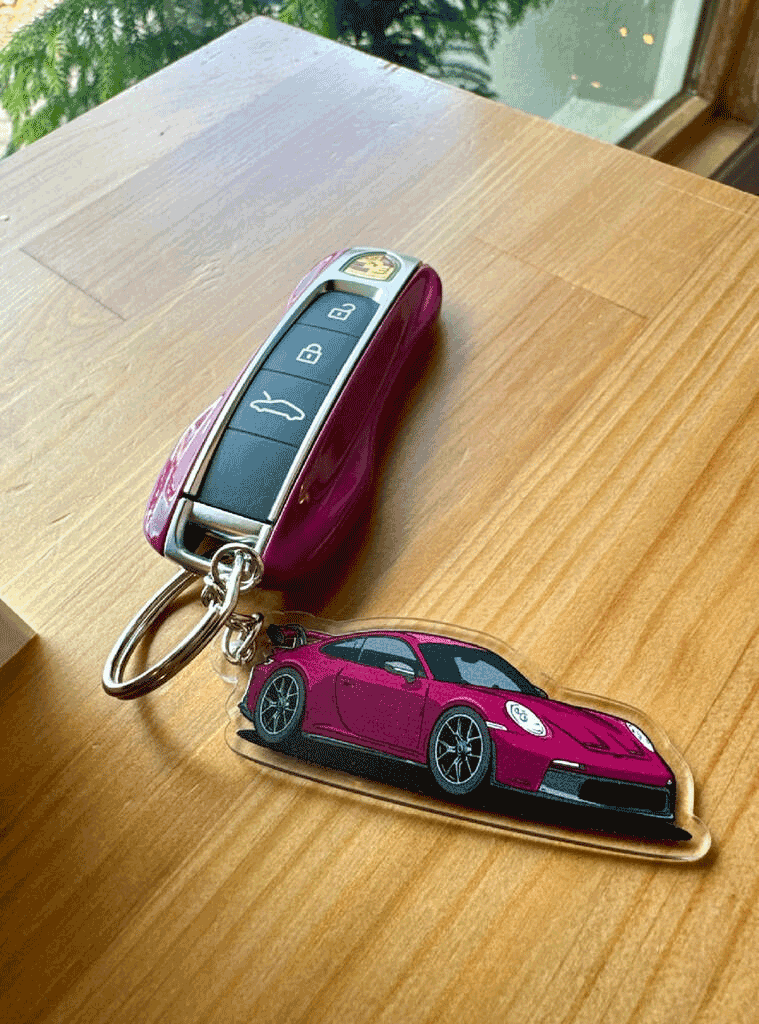
After your image is sent through, the car is turned into a clean design suitable for a premium acrylic keychain. The background is removed, the vehicle shape is refined, and the artwork is prepared for a polished finish.
The aim is not to make your car look generic. It is to keep the personality of the vehicle while turning it into something compact and easy to carry.
Is one photo enough?
Usually, yes. One strong photo is often all that is needed. If you have a favourite angle that captures the car properly, start with that.
If you are torn between a couple of options, go with the image that feels clearest and most recognisable. A cleaner photo normally beats a more dramatic one.
Final thoughts
Uploading your photo for a custom car keychain should feel easy, not stressful. You do not need a studio shot. You just need a clean image that shows the car well and feels true to it.
If you are ready to turn your vehicle into something personal, practical, and giftable, you can start here with the Custom Car Keychain. It is £15, made to feel personal, and simple to order once you have the right photo ready.
FAQs
Can I upload a photo taken on my phone?
Yes. Most modern phone photos are perfectly suitable as long as the image is clear and the car is easy to see.
Do I need to remove the background myself?
No. The background is handled during the design process, so you do not need to edit the image before uploading.
Can I use an older photo of my car?
Yes, as long as it is sharp and shows the vehicle clearly. A meaningful older photo can work really well.
What if my photo is not perfect?
It may still be usable. In general, clarity and a visible car outline matter most.